CS3240 Workshop Case Study

Designing a Workshop Experience for Faster, Lower-Risk Cosplay Learning

This single-page portfolio documents my Workshop-focused contribution within PropBank. It shows the end-to-end design process from user research to insights, design principles, hi-fidelity prototype evidence, and reflection. The scope is Workshop-first, with ecosystem references only where they influence Workshop decisions.

Role: Individual focus on Workshop service

Methods: Semi-structured interviews, affinity synthesis

Core theme: Active search, commitment clarity, non-invasive AI

Foundation

Service Overview and Problem Definition

Workshop is a service within PropBank that allows users to find and save cosplay-related guides for practical execution.

What Is PropBank?

PropBank is a cosplay and ACGN preparation platform that helps users discover events, source cosplay items with trust, access practical guides, and connect with the community in one integrated ecosystem.

It consists of five services: CoNews (event discovery), Gear Library and Marketplace (buy, sell, and rent cosplay items), Workshop (tutorials and guides), PropScan (AI-powered prop identification), and Creator Hub (community sharing).

What Can Workshop Do?

Workshop is a structured instructional service where users can share and learn cosplay creation methods. It centralizes actionable resources for the ACGN community in the same app ecosystem.

Unlike Creator Hub, which supports casual sharing and event memories, Workshop focuses on step-by-step execution and feasibility.

The Problem

Learning resources are important, but they are fragmented and used on-demand rather than consumed algorithmically. Interviewees did not describe guides as content they constantly browse. They search when they hit specific needs, such as makeup, prop construction, styling, or a character-specific challenge.

This research therefore examined what makes a guide collection useful and actionable for real decision-making, which is further detailed in the user research sections below.

Back to top

Phase 1

Design Problem and Success Criteria

Users in the cosplay and ACGN space often search for guides only when they hit a specific task (makeup, prop making, styling), but current resources are fragmented and hard to evaluate quickly. The main Workshop problem is commitment uncertainty: users cannot easily judge time, complexity, and budget before opening a tutorial.

Problem Statement

How might we help users decide if a cosplay guide is feasible for their schedule and skill level, while keeping learning focused, trustworthy, and searchable?

Milestone-Aligned Success Criteria

  • Process rigor: clearly documented research, synthesis, and design logic.
  • Principle application: decisions tied to validated user behavior.
  • Iteration justification: traceable before-and-after changes.
  • Professional presentation: structured and readable evidence.
Back to top

Phase 2

User Research Method and Artifacts

Method

  • Purposive recruitment for users engaged with cosplay or ACGN activities.
  • Criteria: recent event/cosplay interactions within about one year.
  • Semi-structured interviews focused on pain points, workflows, and feature preferences.
  • Synthesis pipeline: notes to coded themes to affinity clustering.

Limitations

  • Small sample size (3 participants) offers directional, not universal, evidence.
  • Data is richer for active community participants than complete newcomers.
  • Findings were still consistent enough to inform Workshop MVP priorities.

Affinity Diagram (Synthesis Evidence)

Shows interview patterns clustered into validated needs and tensions. Open in Figma

Key Findings Relevant to Workshop

Synthesis points used to map evidence into design action.

  1. Users desire easy access to guides relevant to their skill level and budget

    "I want guides tailoered to specific characters and skill levels
    "I prefer guides that clearly state time, difficulty and resources upfront"

    Users consistently valued a system capable of searching for guides that match their specific cosplay goals and constraints. They expressed frustration with generic resources that may assume knowledge or materials they do not have, leading to wasted time and effort. This finding highlights the importance of upfront metadata and search filters in Workshop design to reduce commitment uncertainty and increase guide relevance.

  2. Users want clear signals that a guide is worth their effort

    "I want to know if a guide creator is credible"
    "I need to know if I can do it or not"

    Users often express their uncertainty about whether they can successfully follow a guide, especially for complex cosplays. They want to see trust cues such as creator credibility, user ratings, and hints of difficult steps before committing to a guide. This finding suggests that Workshop should surface trust indicators and detailed previews to help users quickly assess feasibility and reduce the risk of wasted effort.

  3. Users want to know if they should buy a cosplay or follow a guide

    "Can do or not? Sometimes buying might be better"
    "I care about practicality (difficulty, time) before committing"

    Users expressed a common dilemma of whether to make a cosplay using a guide or buy it directly. They want to compare the effort, cost, and time of making versus buying before deciding. This finding indicates that Workshop should facilitate a seamless comparison with the Marketplace for users to explore buy options alongside their make plans, enabling informed decision-making.

How Might We Questions

These questions translate the key findings into design opportunities for Workshop.

How might we help users judge whether a guide fits their skill level, time, and budget before opening it?

Design Direction: Create filters for search and allow guides to list the skills assumed and resource costs.

How might we surface trust cues that help users know whether a guide is credible and replicable?

Design Direction: Create a review system and add a "Replicability" percentage to each guide.

How might we make it easier to compare making versus buying so users can choose the most practical path?

Design Direction: Create a comparison tool that groups Marketplace and Workshop content into one aggregated view.

User Persona

Placeholder portrait for Charmaine Chia persona
Credits: Nani.sg

Charmaine Chia

Age: 23

Background

Charmaine is a relatively seasoned cosplayer who has completed multiple cosplays since age 18. She is not a professional cosplayer and still benefits from learning new techniques for the characters she likes. As a final-year student, she has heavy academic workload and must spend her time and resources carefully to continue cosplaying while completing her studies.

Goals
  • Balance cosplay preparation with final-year project workload.
  • Expand cosplay skills for newer ACGN characters when time allows.
  • Search for specific cosplay resources in a unified platform.
Pain Points
  • Hard to estimate tutorial time and budget before starting.
  • Difficult to decide between buying cosplay and making it.
  • "Costumes these days add too much things," making simpler filters necessary.
  • Unexpected prop-making effort can cause her to give up.
Needs for PropBank
  • Upfront commitment display for time before opening full guide details.
  • Complexity filtering for time-crunch scenarios requiring simpler cosplay approaches.
  • Comparison path for make-versus-buy decisions when tutorials are not feasible.
Primary Services in This Use Case

Workshop

Marketplace (secondary comparison)
User Journey Map

Shows the user's journey when preparing cosplay before our app and opportunities for improvement. Open in Figma

Overall Task Workflow Board (Journey Evidence)

Maps the Workshop decision points inside the broader service ecosystem. Open in Figma
Back to top

Workflow Breakdown

Detailed Task Flows

The overall workflow is broken into three concrete user tasks so each stage can be designed, tested, and iterated independently.

User Task 1: Search for a guide (and save it)

Goal: The user searches for a workshop guide so they can follow it later after gathering required materials.

Context of Use

  • Location: Anywhere
  • Trigger: User intends to commit to making a cosplay for a character.
  • Constraint: User does not have full time or material resources yet.

Success Criteria

  • User finds a relevant guide within 5 minutes when a guide exists.
  • User can filter for a desired cosplay practical path.
  • User saves guide with clear feedback and later retrievability.
  1. User opens Workshop directly or lands from another service.
  2. User searches for a cosplay using keywords and filters.
  3. User refines search with category filters, such as wigs and accessories.
  4. User applies difficulty filters.
  5. User applies budget filters.
  6. User applies time filters.
  7. User evaluates guide cards by thumbnail, rating, and summaries on effort.
  8. User briefly assesses feasibility before deeper evaluation.
  9. User saves the guide for later into a Cosplay Plan (explained later) or detailed view.
  10. User receives save confirmation and exits Task 1.

Steps 3 to 6 may be repeated in any order during search refinement.

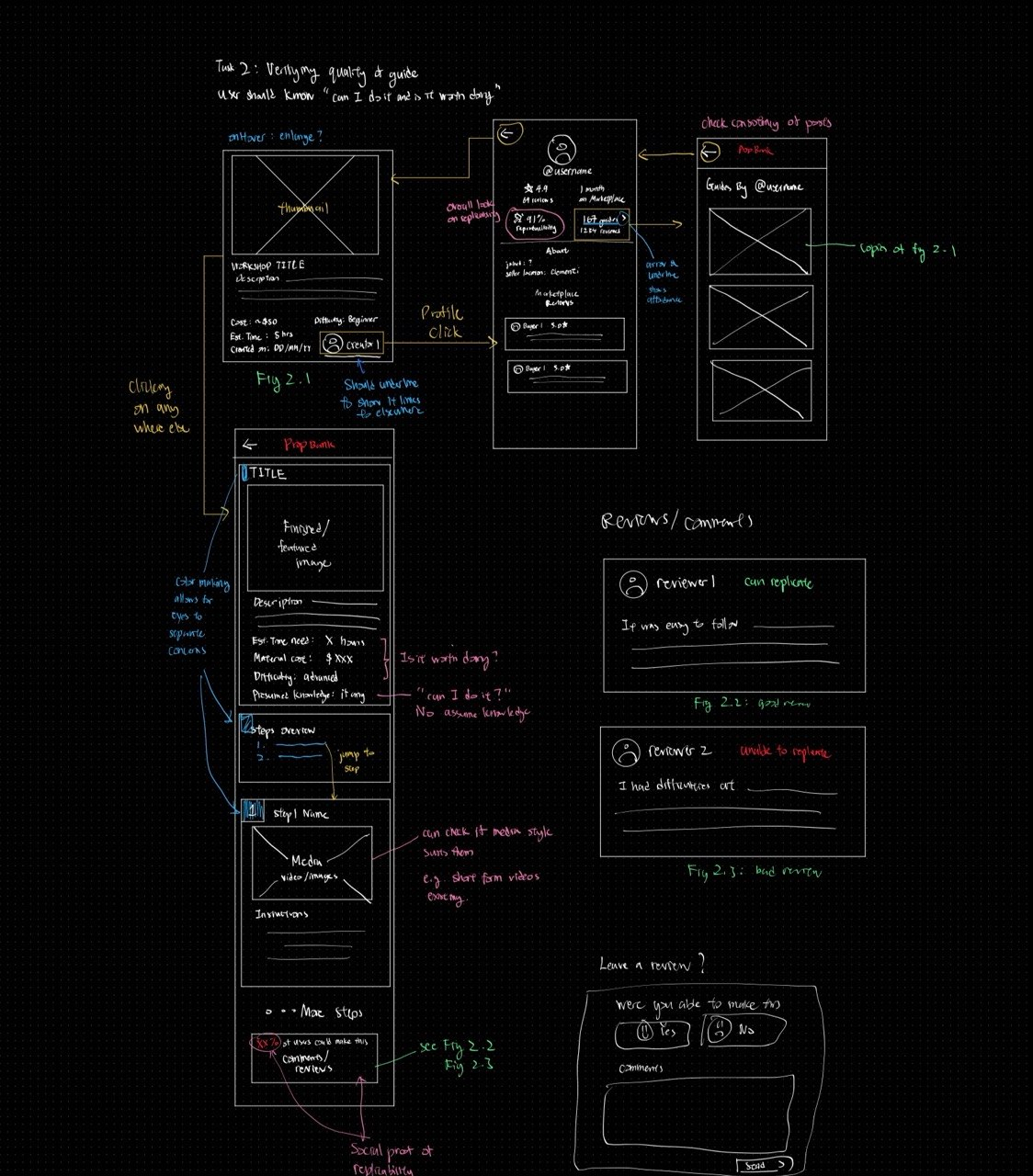
User Task 2: Reading and Creating Reviews

User S and K says:

"Costumes these days are adding too many things. It gets very difficult."

"Can do or not?"

Goal: The user evaluates whether a shortlisted guide is worth the effort by checking summary details, author credibility, and community reviews.

Context of Use

  • Location: Anywhere
  • Trigger: User has already found or shortlisted guides.
  • Constraint: User is uncertain and does not want to waste effort or resources.

Success Criteria

  • User can answer: "Can I do this cosplay?"
  • User can answer: "Is this guide reliable and replicable?"
  • User can successfully add a review if they choose to do so.
  1. User shortlists guides for deeper assessment before full commitment.
  2. User checks creator profile and credibility indicators.
  3. User reviews ratings, comments, and review images.
  4. User looks for success stories and reported difficulties from other users.
  5. User checks summary assumptions against personal skill level.
  6. User inspects difficult steps to judge whether media and text guidance are sufficient.
  7. User chooses to follow the guide (or skip).
  8. User writes and submits an optional rating and review.
  9. User sees confirmation that the review was posted.
  10. User exits Task 2.

User Task 3: Make or Buy Comparison

User S says:

"Can do or not? buying can be better."

Goal: The user decides whether to create a cosplay using a guide or buy directly by comparing cost, effort, and expected outcome.

Context of Use

  • Location: Anywhere
  • Trigger: User is open to both buy and make paths.
  • Constraint: User needs to compare effort needed against cost of buying.

Success Criteria

  • User can compare cost of making against cost of buying wholesale.
  • User reaches a clear decision to make or buy for the selected cosplay.
  1. User opens interested guides from search results.
  2. User adds the guide to a New Plan or Existing Plan.
  3. User reviews make-path needs: materials, tools, time, and required skill level.
  4. User estimates total effort and cost for making.
  5. User moves to Marketplace using call-to-actions or manual navigation.
  6. User browses listings by price and shipping time, then saves options for comparison.
  7. User groups listings and guides into a cosplay plan for side-by-side evaluation.
  8. User compares material cost against listing price.
  9. User compares crafting duration against shipping time.
  10. User decides whether to make or buy with higher confidence.
  11. User exits Task 3.
Back to top

Phase 3

Prototype Iteration: Low-Fi to Hi-Fi

This section showcases the iterative approach from low-fidelity sketches through mid-fidelity flows to the final high-fidelity prototype. Each phase demonstrates design refinements based on research insights.

Low-Fidelity Prototype

low-fidelity sketches of the Workshop search and guide preview layout
Early-stage sketches and wireframes that explore the Workshop search and guide preview layout. This phase tested the basic task flow without visual polish.

Mid-Fidelity Prototype

Workshop Mid-Fi Flow

Interactive wireframes that refine the search, filter, review system and make-vs-buy comparison flows. This phase incorporated user feedback to improve information hierarchy and interaction logic. This phase validated the information architecture and user task flows. Open in Figma

Design System Showcase

Design systems help us standardize elements and signifiers across the app, keeping consistent typography, color palette, components (CTA buttons, search bars, filter chips, snackbars), and navigation patterns. This ensures visual coherence across all five services and reduces user confusion when moving between Workshop, Marketplace, and other services.

PropBank Design System Board

Design System elements of the Propbank app Open in Figma

High-Fidelity Prototype

The hi-fi prototype demonstrates Workshop-first flows where users can discover a guide, evaluate feasibility quickly, and decide whether to make or source items. The interaction model keeps content scannable and actionable rather than feed-heavy.

PropBank Hi-Fi Prototype (Workshop Focus)

Use this board to inspect card metadata, filtering flow, and ecosystem handoffs. Open in Figma

End-to-End Task Demonstration

  • User searches for a character-specific tutorial.
  • Guide card reveals effort and material expectations instantly.
  • User checks suitability against time/budget constraints.
  • User either starts guide or pivots to Marketplace alternatives.

Ecosystem Integration (Workshop Perspective)

  • PropScan can bring users to Workshop Guides based on their uploaded image
  • Workshop can branch to Marketplace for buy-vs-make decisions.
  • Creator Hub may reference guides that matches a Cosplay being depicted there.
Back to top

Phase 4

AI Interaction Design (PropScan)

Why PropScan?

PropScan strengthens cross-service integration and fits the interview preference for non-intrusive, task-based AI scope.

What Can PropScan Do?

  • Upload image of a prop or cosplay reference.
  • Return related Marketplace items, relevant Workshop guides, and Creator Hub posts.
  • Give simple character identification in an overview.

Design Decisions in PropScan

  • It is non-intrusive; users have to deliberately select this feature.
  • PropScan integrates features in a superapp to reduce context switching for cosplay-related needs.

PropScan Prototype

Hifi Prototype for PropScan AI service. Open in Figma
Back to top

Phase 5

Design Principles, Features

Principles Applied

  • Visual Hierarchy: Prioritize important information (e.g., effort and material expectations) before secondary details.
  • Clear User Feedback (e.g., when saving a guide).
  • Prevent User Error by showing warning messages before destructive actions (e.g., deleting a guide from a Cosplay Plan).
  • Keep AI assistive: image/task support, not intrusive feed logic.

MVP Decisions

  • Guides always make difficulty, time, and budget stand out before other information.
  • Buttons that change state (e.g., save, delete) provide clear visual feedback.
  • Delete actions require confirmation to prevent accidental data loss.
  • AI use must be a deliberate choice by the user.

Iteration 1

Initial concept emphasized discovery browsing; users found it too passive and noisy.

Iteration 2

Refocused on active search and guide-preview cards and filters.

Iteration 3

Added cross service interactions such as make-vs-buy handoff to Marketplace for practical decision support.

Iterations are non-exhaustive and was an ongoing process. These are just examples.

Back to top

Phase 6

Reflections

User-Led Design Direction

Our design decisions were shaped directly by user evidence. I initially expected the Workshop feature to depend on targeted algorithms and signifiers to reduce confusion. Through semi-structured interviews, we learned that users prefer active search over algorithmic recommendations, and this helped us identify which signifiers truly matter to them.

Scope Trade-Offs and Feature Depth

The most significant challenge was deciding which features to explore deeply. Since this assignment requires three elaborated features, I focused on a consumer-centered approach rather than a creator-centered one. This best reflects what people looking to cosplay want based on our interview data, but it also means creator reward mechanisms were deprioritized. A future direction is to investigate how to incentivize high-quality guide creation by collecting input from users who create this content.

Outcome and Value for Workshop Users

The final solutions primarily support users as consumers of Workshop content. The selected features reduce cognitive burden and commitment uncertainty when deciding whether to make or buy a cosplay, which is a key decision in the ACGN community.

Back to top